
Unloop
Freefor good
- Mo and your daily scroll budget
- One shield, on its own schedule
- Mindful unlock with three breaths
- Focus sessions up to 25 minutes
No card, no account, no expiry date.
An iPhone app against doomscrolling
Unloop puts walls around the apps that swallow your day. When you really need one, you take three slow breaths first. And Mo, your mind drawn in ink, shows how today is going.
Coming soon on theApp Store
See how it worksFree to start. No account. Your usage never leaves your iPhone.
Feeling steady. A little scrolling, still in control.
18 minof a 1 h budget
CalmHow it works
Pick the apps that eat your day. Next time your thumb goes for one, it meets a wall, and a choice.

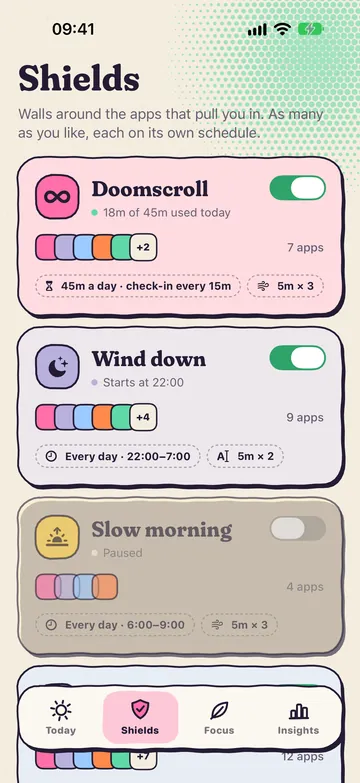
Shield
Choose the apps and when the wall stands: always, on weekdays, or overnight. As many shields as you like, and no 50-app cap.
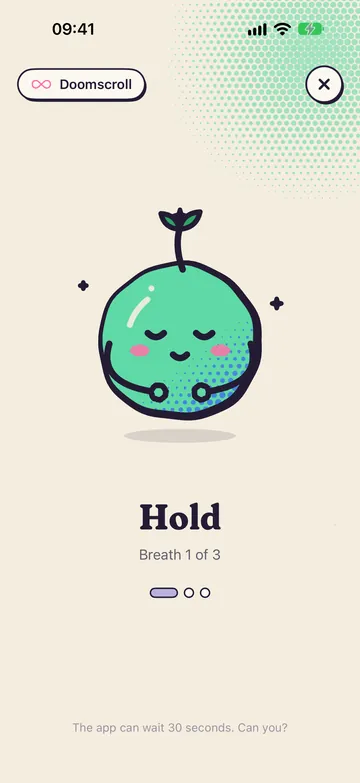
Breathe
Tap “Unlock mindfully” on the shield and you land straight in Unloop. Three slow breaths. Then, if you like, type what you came for.
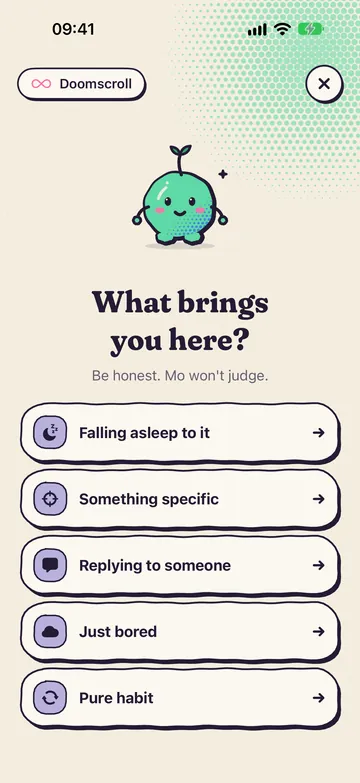
Choose
What brings you here? If it’s boredom or habit, Mo suggests something better. Still want in? Pick the minutes.
Only the app you tapped unlocks. Everything else stays behind the wall.
Meet Mo
Mo lives on your Today screen and wears your screen time on their face. Stay under a quarter of your daily budget and Mo glows. Blow through it and Mo melts into a puddle, still clutching a glowing phone.
under 25% of the budget
I feel amazing. Your attention is all yours today.
under 60%
Feeling steady. A little scrolling, still in control.
under 100%
Getting droopy over here… most of today’s budget is gone.
budget blown
I’m melting. Budget’s blown, let the shields help us.
Mo also jumps for joy when you walk away from a shield, sighs when you unlock, and meditates while you focus. Go on, tap one.
Focus & strict mode
Set the dial, start a session. Every shielded app stays shut until the timer ends, with a Live Activity on your lock screen and in the Dynamic Island.
Ending early means holding a button down. On purpose.
shields are up
No unlock button, no breathing your way past. For the apps you can’t negotiate with.
Three mindful unlocks a day, say. After that the wall stays up until tomorrow.
While a shield is up, the app can’t be deleted. Future you can’t sneak out the back door.
Privacy
Your Screen Time data is processed by iOS, on your iPhone. Apple doesn’t even let Unloop see which apps you use: the app only gets anonymous tokens it can put walls around. Shields, streaks and intentions live on your phone and nowhere else.
Read the privacy policy →Pricing
Plenty of blockers greet you with a paywall before you’ve seen a single screen. We’d rather you meet Mo first and decide later.
Freefor good
No card, no account, no expiry date.
$29.99a year
7-day free trial
Everything in Unloop, plus
or $4.99 a month
or $59.99 once, for life
No countdowns, no fake discounts. Cancel any time in your Apple account settings. Prices aren’t final until launch.
FAQ
Shields are built on Apple’s Screen Time API. iOS asks you once whether Unloop may manage app access on this iPhone. That permission lets the app put up walls. It doesn’t let us watch what you do.
No. Apple hands the app anonymous tokens instead of app names, and your usage numbers are drawn by iOS in a sealed-off view. None of it is ever sent anywhere. The only thing that leaves the app is feedback you choose to send us.
With a normal shield, yes, mindfully: breathe, say why, pick your minutes. With a strict shield, no. And in commitment mode the app can’t be deleted while a shield is up.
Not yet. Unloop is made for your own iPhone. Setting it up for your kids through Family Sharing is coming later.
Any iPhone with iOS 26 or later. From iOS 26.5, “Unlock mindfully” opens Unloop straight from the shield. Before that, a notification takes you there.
Soon. Unloop is in its last round of testing before it goes to the App Store, free to download.
Unloop is coming to the App Store soon. Free to start.
Coming soon on theApp Store